


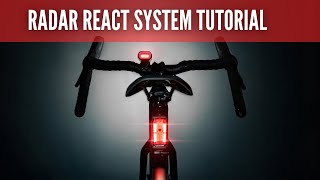


LEZYNE RADAR REACT SYSTEM / MATTE BLACK Front and rear light set with radar
1-LED-43P-V117The Lezyne Radar React system combines the React Drive front light and Radar Drive rear light with radar technology for maximum cyclist safety. The intuitive system provides instant visual and audible alerts when vehicles approach, ensuring a calm and confident ride in the city and on the road.
Simple and elegant LED lights with a robust design provide high performance of up to 1200 lumens at the front and 300 lumens at the rear, while the lightweight construction and universal mounting allow for quick and secure attachment to almost all types of seat posts and handlebars.lt;li>Radar vehicle detection
The Radar Drive rear light system detects vehicles approaching from behind and automatically triggers visual and audible alerts, increasing rider safety and confidence.
The React Drive front light provides up to 1200 lumens for day and night riding, and the Radar Drive rear light shines up to 300 lumens, with long battery life for reliable performance throughout the day.Radar detection of vehicles from behind. Visual and audible alerts.Connection to the Radar Ally app
Specifications: Radar Drive Rear (rear light):Luminosity: 300 lumens
Battery life: 20 hours
Weight: 122 g
Dimensions: 78 × 48.9 × 47.6 mm
&React Drive Front (front light): Luminous intensity: 1200 lumens Battery life: 70 hours Weight: 156 g Dimensions: 89.8 × 42 × 35.5 mmWeight: 156 g Dimensions: 89.8 × 42 × 35.5 mm Other features: USB-C charging, robust construction, compatibility with Radar Ally and GPS bike computers.lt;strong>LEZYNE RADAR REACT SYSTEM – QUICK START GUIDE
1. Preparing the lights and app
Charge the front and rear lights using a USB-C cable (not included).
Download Lezyne Radar Ally from the App Store (iOS) or Google Play (Android).
For detailed instructions, scan the QR code on the packaging or watch the video tutorial.
2. Powering on and pairing Turn on the front and rear lights. In the app, tap Connect and select your devices.When both lights are paired, the front React will provide alerts for vehicles detected by the rear Radar Drive.
3. Firmware updates. Open the device menu in the app and start the firmware update if available. Settings and controls. Use the app to set alert levels, turn lights on/off, and select lighting modes as needed. Vehicle alerts
The app displays vehicles approaching from behind in real time.
You can watch visual animations or receive only audio alerts (the app can run in your pocket).
6. Disconnect and Close
To exit the app, select Disconnect and Close (Android) or swipe to close the app (iPhone).
The lights will disconnect from the app, but the front React will continue to provide radar alerts.
KE STAŽENÍ:
Manuál LEZYNE RADAR REACT SYSTEM.pdf
Premium quality bicycle accessories made from the finest materials available. Designed, engineered, manufactured and tested in-house. Pure functionality and pure aesthetics is the essence of the lezyne brand.


Safe shopping Your data is safe

We ship goods in stock immediately

20,000 products in stock
